| 일 | 월 | 화 | 수 | 목 | 금 | 토 |
|---|---|---|---|---|---|---|
| 1 | 2 | 3 | 4 | 5 | 6 | |
| 7 | 8 | 9 | 10 | 11 | 12 | 13 |
| 14 | 15 | 16 | 17 | 18 | 19 | 20 |
| 21 | 22 | 23 | 24 | 25 | 26 | 27 |
| 28 | 29 | 30 | 31 |
Tags
- 으
- es6
- jwt
- 0.5px border
- 문서번호
- github
- 타입스크립트
- Props
- 클론코딩
- Strict
- 10px
- angular
- TS
- 1px border
- 0.75px border
- font-size
- ES5
- ZOOM
- npm
- 서버리스 #
- 0.25px border
- 당근마켓
- 컴포넌튼
- literal
- 전역변수
- &연산
- TypeScript
- 데이터베이스 #try #이중
- entity
- Websocket
Archives
- Today
- Total
복잡한뇌구조마냥
[AWS] Lambda + CloudFront 이미지 최적화 ( 리사이징, 캐싱 ) 본문
1. 배경 및 문제 상황
기존 아키텍처의 한계
프로젝트에서 프로필 이미지 업로드 시 Spring Boot의 ImageOptimizer를 사용하여 동기적으로 리사이징을 처리했습니다.
기존 방식의 문제점:
@Service
public class ImageOptimizer {
    public String optimizeAndUpload(MultipartFile image) {
        // 1. 이미지 검증
        validateImage(image);

        // 2. 동기 리사이징 (사용자가 대기)
        BufferedImage resized = resize(image, 1024, 1024);

        // 3. S3 업로드
        String url = s3Uploader.upload(resized);

        return url; // 1-2초 후 응답
    }
}
문제점 분석:
- ⏱️ 응답 지연: 이미지 리사이징 완료까지 1-2초 대기
- 📦 단일 크기: 1024px 한 가지 크기만 생성
- 🚫 확장성 부족: 썸네일, 프리뷰 등 다양한 크기 필요
- 💰 대역폭 낭비: 목록 화면에서도 큰 이미지 전송
개선 목표
- 비동기 처리: 사용자는 즉시 응답 받고, 리사이징은 백그라운드에서 실행
- 다중 크기 지원: 썸네일(150x150) 등 용도별 최적 크기 생성
- CDN 활용: CloudFront를 통한 빠른 이미지 전송
- 비용 최적화: 불필요한 트래픽 감소
2. 개선된 아키텍처
전체 플로우
[프론트엔드]
    ↓ (프로필 이미지 업로드)
[Spring Boot 백엔드]
    ↓ (원본 이미지를 S3에 업로드)
[S3: originals/]
    ↓ (S3 Event Notification 트리거)
[AWS Lambda] (비동기 실행)
    ↓ (자동 리사이징: 150x150 썸네일)
[S3: resized/thumbnail/]
    ↓
[CloudFront CDN] (캐싱 및 고속 전송)
    ↓
[사용자]
디렉토리 구조
S3 Bucket (team1-chwimeet-bucket)
├── members/
│   └── profile/
│       ├── originals/              # 원본 이미지
│       │   └── uuid-photo.jpg
│       └── resized/                # 리사이징된 이미지
│           └── thumbnail/          # 150x150 썸네일
│               └── uuid-photo.webp
3. 구현 상세
3.1 Terraform 인프라 구성
Lambda 함수 정의
# lambda/main.tf

# Lambda 실행 역할
resource "aws_iam_role" "lambda_profile_resizer" {
  name = "${var.project_name}-lambda-profile-resizer-role"

  assume_role_policy = jsonencode({
    Version = "2012-10-17"
    Statement = [{
      Action = "sts:AssumeRole"
      Effect = "Allow"
      Principal = {
        Service = "lambda.amazonaws.com"
      }
    }]
  })
}

# Lambda 정책 (최소 권한 원칙)
resource "aws_iam_role_policy" "lambda_profile_resizer_policy" {
  name = "${var.project_name}-lambda-profile-resizer-policy"
  role = aws_iam_role.lambda_profile_resizer.id

  policy = jsonencode({
    Version = "2012-10-17"
    Statement = [
      {
        Sid    = "S3ReadOriginals"
        Effect = "Allow"
        Action = ["s3:GetObject"]
        Resource = "${aws_s3_bucket.main.arn}/members/profile/originals/*"
      },
      {
        Sid    = "S3WriteResized"
        Effect = "Allow"
        Action = ["s3:PutObject"]
        Resource = "${aws_s3_bucket.main.arn}/members/profile/resized/*"
      },
      {
        Sid    = "CloudWatchLogs"
        Effect = "Allow"
        Action = [
          "logs:CreateLogGroup",
          "logs:CreateLogStream",
          "logs:PutLogEvents"
        ]
        Resource = "arn:aws:logs:*:*:*"
      }
    ]
  })
}

# Lambda 함수
resource "aws_lambda_function" "profile_resizer" {
  filename         = "${path.module}/lambda/profile_resizer.zip"
  function_name    = "${var.project_name}-profile-resizer"
  role            = aws_iam_role.lambda_profile_resizer.arn
  handler         = "index.handler"
  runtime         = "nodejs20.x"
  timeout         = 30
  memory_size     = 512
  source_code_hash = filebase64sha256("${path.module}/lambda/profile_resizer.zip")

  environment {
    variables = {
      BUCKET_NAME = aws_s3_bucket.main.id
      SOURCE_PREFIX = "members/profile/originals/"
      DESTINATION_PREFIX = "members/profile/resized/thumbnail/"
    }
  }
}

# CloudWatch Logs
resource "aws_cloudwatch_log_group" "profile_resizer" {
  name              = "/aws/lambda/${aws_lambda_function.profile_resizer.function_name}"
  retention_in_days = 7
}
S3 이벤트 트리거 설정
# S3 이벤트 → Lambda 연결
resource "aws_lambda_permission" "allow_s3_profile" {
  statement_id  = "AllowExecutionFromS3Profile"
  action        = "lambda:InvokeFunction"
  function_name = aws_lambda_function.profile_resizer.function_name
  principal     = "s3.amazonaws.com"
  source_arn    = aws_s3_bucket.main.arn
}

resource "aws_s3_bucket_notification" "profile_upload" {
  bucket = aws_s3_bucket.main.id

  lambda_function {
    id                  = "profile-image-upload"
    lambda_function_arn = aws_lambda_function.profile_resizer.arn
    events              = ["s3:ObjectCreated:*"]
    filter_prefix       = "members/profile/originals/"
  }

  depends_on = [aws_lambda_permission.allow_s3_profile]
}
CloudFront 배포
# CloudFront Origin Access Identity
resource "aws_cloudfront_origin_access_identity" "s3_oai" {
  comment = "${var.project_name} S3 OAI"
}

# S3 버킷 정책 (CloudFront만 접근 허용)
resource "aws_s3_bucket_policy" "cloudfront_access" {
  bucket = aws_s3_bucket.main.id

  policy = jsonencode({
    Version = "2012-10-17"
    Statement = [{
      Sid    = "AllowCloudFrontOAI"
      Effect = "Allow"
      Principal = {
        AWS = aws_cloudfront_origin_access_identity.s3_oai.iam_arn
      }
      Action   = "s3:GetObject"
      Resource = "${aws_s3_bucket.main.arn}/*"
    }]
  })
}

# CloudFront Distribution
resource "aws_cloudfront_distribution" "main" {
  enabled = true
  comment = "${var.project_name} CDN"

  origin {
    domain_name = aws_s3_bucket.main.bucket_regional_domain_name
    origin_id   = "S3-${aws_s3_bucket.main.id}"

    s3_origin_config {
      origin_access_identity = aws_cloudfront_origin_access_identity.s3_oai.cloudfront_access_identity_path
    }
  }

  default_cache_behavior {
    allowed_methods        = ["GET", "HEAD", "OPTIONS"]
    cached_methods         = ["GET", "HEAD"]
    target_origin_id       = "S3-${aws_s3_bucket.main.id}"
    viewer_protocol_policy = "redirect-to-https"
    compress               = true

    forwarded_values {
      query_string = false
      cookies {
        forward = "none"
      }
    }

    min_ttl     = 0
    default_ttl = 86400   # 1일
    max_ttl     = 31536000 # 1년
  }

  restrictions {
    geo_restriction {
      restriction_type = "none"
    }
  }

  viewer_certificate {
    cloudfront_default_certificate = true
  }
}

output "cloudfront_domain" {
  value = aws_cloudfront_distribution.main.domain_name
}
3.2 Lambda 함수 구현
package.json
{
  "name": "profile-image-resizer",
  "version": "1.0.0",
  "description": "Lambda function for resizing profile images",
  "main": "index.js",
  "scripts": {
    "build": "node create-zip.js"
  },
  "dependencies": {
    "@aws-sdk/client-s3": "^3.947.0",
    "sharp": "^0.33.5"
  },
  "devDependencies": {
    "archiver": "^7.0.1"
  }
}
index.js
const sharp = require('sharp');
const { S3Client, GetObjectCommand, PutObjectCommand } = require("@aws-sdk/client-s3");

const s3 = new S3Client({ region: "ap-northeast-2" });

// 환경변수
const BUCKET_NAME = process.env.BUCKET_NAME;
const SOURCE_PREFIX = process.env.SOURCE_PREFIX || 'members/profile/originals/';
const DESTINATION_PREFIX = process.env.DESTINATION_PREFIX || 'members/profile/resized/thumbnail/';

const THUMBNAIL_SIZE = 150;
const QUALITY = 85;

function streamToBuffer(stream) {
    return new Promise((resolve, reject) => {
        const chunks = [];
        stream.on("data", chunk => chunks.push(chunk));
        stream.on("end", () => resolve(Buffer.concat(chunks)));
        stream.on("error", reject);
    });
}

exports.handler = async (event) => {
    console.log('Event:', JSON.stringify(event, null, 2));

    // S3 이벤트에서 정보 추출
    const bucket = event.Records[0].s3.bucket.name;
    const key = decodeURIComponent(event.Records[0].s3.object.key.replace(/\+/g, ' '));

    console.log(`Event received - Bucket: ${bucket}, Key: ${key}`);

    // 버킷 검증
    if (bucket !== BUCKET_NAME) {
        console.log(`❌ Skip: Wrong bucket (expected: ${BUCKET_NAME})`);
        return { statusCode: 200, body: 'Skipped: wrong bucket' };
    }

    // 경로 검증
    if (!key.startsWith(SOURCE_PREFIX)) {
        console.log(`❌ Skip: Wrong path (expected: ${SOURCE_PREFIX})`);
        return { statusCode: 200, body: 'Skipped: wrong path' };
    }

    try {
        // 원본 이미지 다운로드
        console.log(`📥 Downloading: ${key}`);
        const originalImage = await s3.send(
            new GetObjectCommand({
                Bucket: bucket,
                Key: key
            })
        );

        const imageBuffer = await streamToBuffer(originalImage.Body);

        // 이미지 리사이징 (정사각형 썸네일)
        console.log(`🖼️  Resizing to ${THUMBNAIL_SIZE}x${THUMBNAIL_SIZE}...`);
        const resizedImage = await sharp(imageBuffer)
            .resize(THUMBNAIL_SIZE, THUMBNAIL_SIZE, {
                fit: 'cover',
                position: 'centre'
            })
            .webp({
                quality: QUALITY,
                effort: 6
            })
            .toBuffer();

        // 대상 key 생성
        const filename = key.split('/').pop();
        const nameWithoutExt = filename.substring(0, filename.lastIndexOf('.'));
        const destinationKey = `${DESTINATION_PREFIX}${nameWithoutExt}.webp`;

        // S3 업로드
        console.log(`📤 Uploading: ${destinationKey}`);
        await s3.send(
            new PutObjectCommand({
                Bucket: bucket,
                Key: destinationKey,
                Body: resizedImage,
                ContentType: "image/webp",
                CacheControl: "max-age=31536000"
            })
        );

        console.log(`✅ Success: ${key} → ${destinationKey}`);
        console.log(`Size: ${imageBuffer.length} → ${resizedImage.length} bytes`);

        return {
            statusCode: 200,
            body: JSON.stringify({
                original: key,
                thumbnail: destinationKey,
                size: `${THUMBNAIL_SIZE}x${THUMBNAIL_SIZE}`,
                originalSize: imageBuffer.length,
                thumbnailSize: resizedImage.length
            })
        };

    } catch (error) {
        console.error(`❌ Error: ${error.message}`);
        console.error(error.stack);

        // 에러가 발생해도 성공으로 처리 (무한 재시도 방지)
        return {
            statusCode: 200,
            body: JSON.stringify({
                error: error.message
            })
        };
    }
};
3.3 Lambda 빌드 명령어 (도커를 이용한 빌드 진행)
MSYS_NO_PATHCONV=1 docker run --rm \
  -v "$PWD":/var/task \
  -w /var/task \
  node:20-bullseye \
  bash -c "npm install && npm run build"
3.4 Spring Boot 백엔드 수정
S3Uploader 개선
@Slf4j
@Component
@RequiredArgsConstructor
public class S3Uploader {

    private final S3Client s3Client;
    private final CloudFrontClient cloudFrontClient;

    @Value("${cloud.aws.s3.bucket}")
    private String bucket;

    @Value("${cloud.aws.cloudfront.distribution-id}")
    private String distributionId;

    private static final String PROFILE_ORIGINAL_PREFIX = "members/profile/originals/";
    private static final String PROFILE_THUMBNAIL_PREFIX = "members/profile/resized/thumbnail/";

    /**
     * 프로필 원본 이미지 업로드
     * Lambda가 자동으로 썸네일 생성
     */
    public String uploadProfileOriginal(MultipartFile image, String memberId) {
        String filename = UUID.randomUUID() + "-" + image.getOriginalFilename();
        String key = PROFILE_ORIGINAL_PREFIX + filename;

        try {
            PutObjectRequest request = PutObjectRequest.builder()
                .bucket(bucket)
                .key(key)
                .contentType(image.getContentType())
                .build();

            s3Client.putObject(request,
                RequestBody.fromBytes(image.getBytes()));

            log.info("Profile original uploaded: {}", key);
            return getS3Url(key);

        } catch (IOException e) {
            log.error("Failed to upload profile image", e);
            throw new RuntimeException("이미지 업로드 실패", e);
        }
    }

    /**
     * 프로필 썸네일 URL 반환
     * Lambda가 생성한 파일의 CloudFront URL
     */
    public String getProfileThumbnailUrl(String originalUrl) {
        // originalUrl: https://bucket.s3.ap-northeast-2.amazonaws.com/members/profile/originals/uuid-photo.jpg
        // thumbnailUrl: https://d36l0l4wrxkoay.cloudfront.net/members/profile/resized/thumbnail/uuid-photo.webp

        String filename = extractFilename(originalUrl);
        String nameWithoutExt = filename.substring(0, filename.lastIndexOf('.'));
        String thumbnailFilename = nameWithoutExt + ".webp";

        return getCloudFrontUrl(PROFILE_THUMBNAIL_PREFIX + thumbnailFilename);
    }

    /**
     * 프로필 이미지 삭제 (원본 + 썸네일 + CloudFront 캐시 무효화)
     */
    public void deleteProfileImage(String originalUrl) {
        try {
            // 1. 원본 삭제
            String originalKey = extractKey(originalUrl);
            deleteS3Object(originalKey);
            log.info("Deleted original: {}", originalKey);

            // 2. 썸네일 삭제
            String filename = extractFilename(originalUrl);
            String nameWithoutExt = filename.substring(0, filename.lastIndexOf('.'));
            String thumbnailKey = PROFILE_THUMBNAIL_PREFIX + nameWithoutExt + ".webp";
            deleteS3Object(thumbnailKey);
            log.info("Deleted thumbnail: {}", thumbnailKey);

            // 3. CloudFront 캐시 무효화
            if (distributionId != null && !distributionId.isEmpty()) {
                invalidateCloudFrontCache(originalKey, thumbnailKey);
            }

        } catch (Exception e) {
            log.error("Failed to delete profile image", e);
            throw new RuntimeException("이미지 삭제 실패", e);
        }
    }

    /**
     * CloudFront 캐시 무효화
     */
    private void invalidateCloudFrontCache(String... paths) {
        try {
            List<String> pathList = Arrays.stream(paths)
                .map(path -> "/" + path)
                .collect(Collectors.toList());

            InvalidationBatch batch = InvalidationBatch.builder()
                .paths(Paths.builder()
                    .quantity(pathList.size())
                    .items(pathList)
                    .build())
                .callerReference(String.valueOf(System.currentTimeMillis()))
                .build();

            CreateInvalidationRequest request = CreateInvalidationRequest.builder()
                .distributionId(distributionId)
                .invalidationBatch(batch)
                .build();

            CreateInvalidationResponse response = cloudFrontClient.createInvalidation(request);
            log.info("CloudFront invalidation created: {}", response.invalidation().id());

        } catch (Exception e) {
            log.warn("CloudFront invalidation failed (non-critical): {}", e.getMessage());
        }
    }

    private void deleteS3Object(String key) {
        DeleteObjectRequest request = DeleteObjectRequest.builder()
            .bucket(bucket)
            .key(key)
            .build();
        s3Client.deleteObject(request);
    }

    private String getS3Url(String key) {
        return String.format("https://%s.s3.ap-northeast-2.amazonaws.com/%s", bucket, key);
    }

    private String getCloudFrontUrl(String key) {
        return String.format("https://d36l0l4wrxkoay.cloudfront.net/%s", key);
    }

    private String extractKey(String url) {
        return url.substring(url.indexOf(".com/") + 5);
    }

    private String extractFilename(String url) {
        return url.substring(url.lastIndexOf('/') + 1);
    }
}
application.yml 설정
cloud:
  aws:
    s3:
      bucket: ${S3_BUCKET_NAME}
    cloudfront:
      distribution-id: ${CLOUDFRONT_DISTRIBUTION_ID:}
Terraform에서 환경 변수 자동 주입
# EC2 인스턴스에 환경 변수 설정
resource "aws_instance" "app_server" {
  # ... 기타 설정 ...

  user_data = templatefile("${path.module}/user_data.sh", {
    s3_bucket_name = aws_s3_bucket.main.id
    cloudfront_distribution_id = aws_cloudfront_distribution.main.id
  })
}
# user_data.sh
#!/bin/bash
# 환경 변수 파일 생성
cat > /home/ubuntu/.env << EOF
S3_BUCKET_NAME=${s3_bucket_name}
CLOUDFRONT_DISTRIBUTION_ID=${cloudfront_distribution_id}
EOF
# Docker Compose 재시작
cd /home/ubuntu/app
docker-compose down
docker-compose up -d4. 업로드 예시

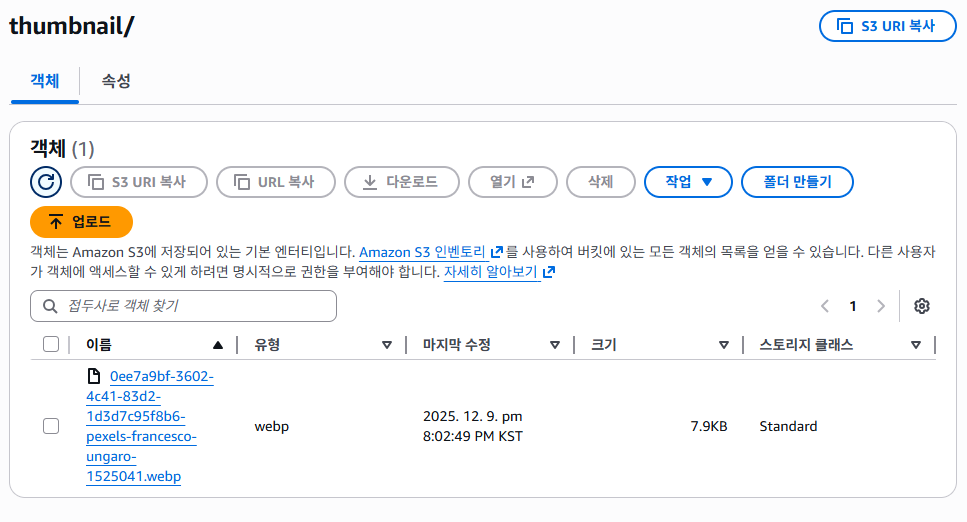
- originals/ 폴더에 이미지가 올라가는 것을 트리거로 lambda에 의해 thumbnail/ 폴더에 리사이징된 이미지 생성
- 3.1MB이미지를 7.9KB까지 리사이징
5. 운영하면서 느낀 점 & 트레이드오프
좋았던 점
- 프론트는 그냥 URL만 받으면 끝
- 더 이상 Presigned URL 발급 API를 쓸 필요가 없다.
- img src에 CloudFront URL만 넣으면 CDNs + 브라우저 캐시까지 모두 활용 가능.
- 서버 부하 없이 리사이징
- 썸네일 생성은 Lambda에서 비동기로 처리되기 때문에,
- 업로드 API 응답 속도에는 영향을 주지 않는다.
- 트래픽 & 용량 부담 감소
- 원본(JPEG/PNG) → 썸네일(WebP)로 내려주다 보니
- 실제 프로필 이미지 요청당 데이터 크기가 꽤 줄어들었다.
- 경로 규칙만 지키면 확장도 쉽다
- 나중에 다른 크기(예: medium, large) 썸네일을 추가하고 싶으면,
- Lambda 내에서 여러 사이즈를 동시에 만들거나
- prefix만 다르게 두고 확장하면 된다.
아쉬웠던 점 / 고려할 점
- 처음에는 구조가 조금 복잡하다
- EC2, S3, CloudFront, Lambda, IAM, S3 Notification까지 한 번에 건드리게 된다.
- 단순한 토이 프로젝트라면 “백엔드에서 바로 리사이징 → S3 업로드”가 더 나을 수도 있다.
- 리사이징 타이밍 이슈
- 이론적으로는 “업로드 직후 썸네일이 아직 안 만들어져서 404 나올 수 있지 않나?” 하는 걱정이 생긴다.
- 필요하면 “기본 프로필 이미지 → 썸네일 준비되면 교체” 같은 전략도 추가 가능하다.
- 리사이징이 동작하면 비동기적으로 이미지를 생성중이라 경로는 있는데 이미지가 없는 경우가 생길 수 있음.
- 프론트에서 리사이징 되는 이미지가 받아올 때까지 debounce 걸면서 이미지를 새로 불러올 수 있도록 처리함
- 트래픽 규모에 따라 오버엔지니어링일 수도 있음
- 유저 수/트래픽이 적다면 Presigned + 원본 리사이징도 충분하다.
- 이 구조는 장기적으로 트래픽이 늘어날 걸 가정하고 미리 구성해 둔 느낌에 가깝다.
마무리
프로젝트에서 적용한
“S3 + Lambda + CloudFront로 이미지 자동 리사이징 & 캐싱”
구조를 정리했다.
- 업로드는 항상 원본만
- 리사이징은 Lambda가 비동기로 처리
- 조회는 CloudFront 썸네일 URL만 사용
- 삭제 시에는 원본 + 썸네일 같이 정리
하는 식으로 역할을 나누니,
코드도 깔끔해지고 이후 확장(다른 사이즈, 다른 도메인)에 대한 여지도 생겼다.
LIST
'BE > Infra' 카테고리의 다른 글
| [Infra] Prometheus + Grafana 서버 모니터링 (Docker 기반) (0) | 2025.12.03 |
|---|---|
| [AWS] 배포 정리(EC2 + ECR + RDS + Nginx) (0) | 2025.10.16 |
| Json-server, heroku, env (서버 배포) (0) | 2022.09.04 |
'BE/Infra' Related Articles
more


